
An AR aging report is a list of every dollar your practice is owed, sorted by how long it has been waiting. It is usually broken into buckets: 0 to 30 days, 31 to 60, 61 to 90, 91 to 120, and over 120. The report answers one question better than any other document in your office. Not "how much are we owed," but "how much of what we are owed is still realistically collectible."
That second question is the one that matters, and it is the one most aging reports get skimmed past.
What the report is actually telling you
Every practice management system produces this report. Most offices run it, glance at the total, and move on.
The total is the least useful number on the page.
A practice owed $400,000 with 85% of it under 30 days old is in excellent shape. A practice owed $180,000 with 40% of it past 90 days is in trouble. The smaller number is the worse situation. Only the distribution tells you which practice you are.
Here is the way to hold it: the total is a measure of volume, the distribution is a measure of health.

The buckets, and what each one means
0 to 30 days. Normal. This is money in transit. Clean electronic claims to most commercial payers land in this window. A healthy practice keeps the majority of its AR here.
31 to 60 days. Watch. Some payers are simply slower, and some of this is legitimate float. But a claim sitting at day 45 with no remittance and no denial has usually hit something: a rejection you did not see, a secondary that was never billed, or a patient balance that was never statemented.
61 to 90 days. Act. At this point the claim has a problem and the problem has an owner. Something in this bucket needs a person looking at it individually, not a batch process.
91 to 120 days. Urgent. Collection rates drop sharply here, and several payer filing windows start closing.
Over 120 days. Triage. Historically, collection rates on balances this old can fall to roughly half, and for some payers the timely filing window has already closed. Money in this bucket is not gone, but it is no longer routine to recover.
The numbers to compare yourself against
You need a reference point, or the report is just a pile of figures.
Days in AR. This is your total AR divided by your average daily charges. It tells you, on average, how long a dollar waits.
Commonly cited guidance drawn from HFMA benchmarks puts the target at 30 to 40 days. MGMA benchmarks for higher-performing groups land closer to 30 to 35 days. Broad industry figures often cluster nearer to 47 days.
Percentage of AR over 90 days. This is the single most diagnostic number on the report.
Commonly cited industry guidance: under 15%. Stronger performers: closer to 10%. HFMA-based guidance: under 10%.
Net collection rate. What you collected against what you were contractually allowed to collect.
Industry standard: 95% or higher. Top performers: approaching 98%. Below 90% is a signal to look hard at denials and write-offs.
A note on benchmarks, because it matters. These figures vary meaningfully by specialty, payer mix, and practice size. A behavioral health practice with heavy Medicaid volume will not look like an orthopedic group with a commercial-heavy mix, and it should not be expected to. Use benchmarks as a direction, not a verdict.
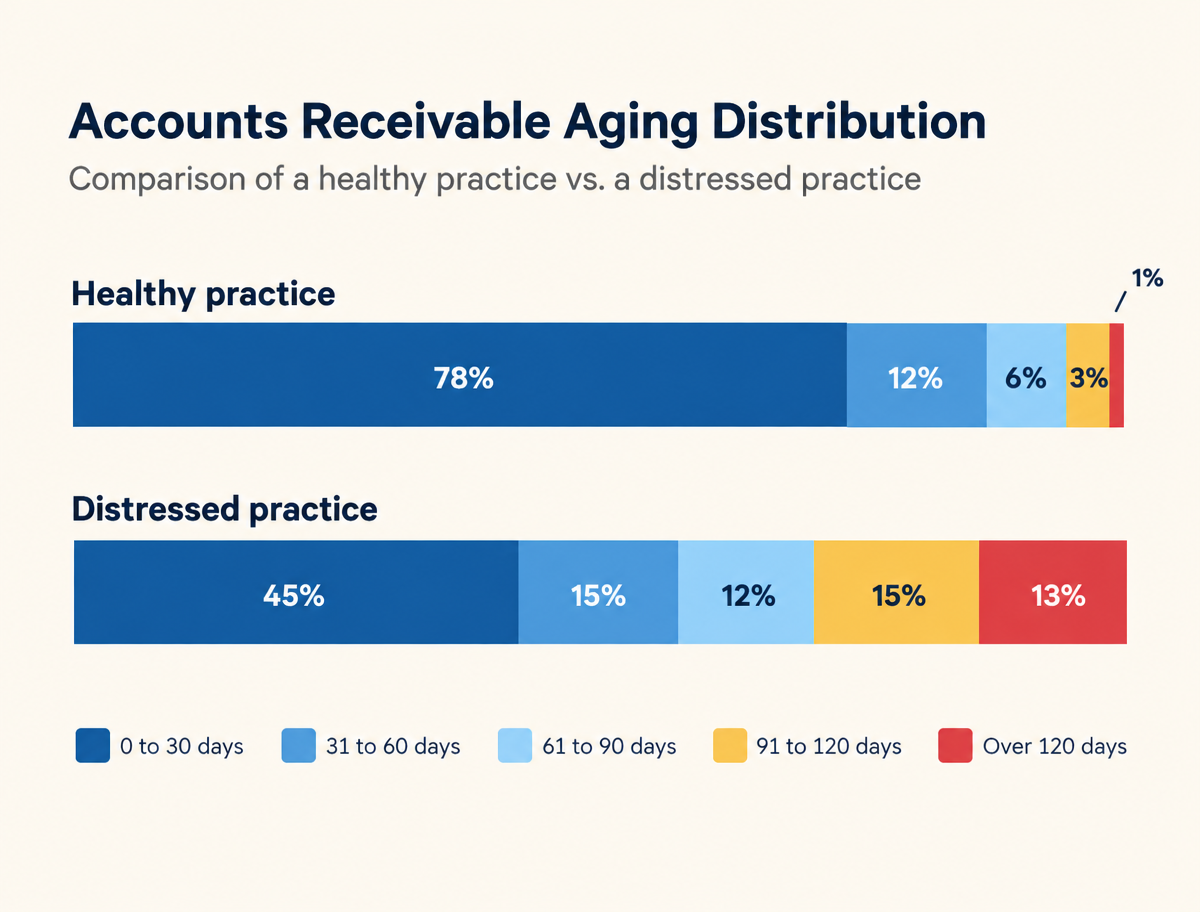
Why the 90-day line is the line that matters
You might be thinking: money is money, and old money still gets collected eventually.
Sometimes. But three things happen at once around day 90, and they compound.
Filing windows start closing. Payer deadlines run anywhere from 90 days to a full year. Past 90, you are inside the danger zone for the shortest windows, and a claim that ages out is usually not billable to the patient either. That balance is written off entirely.
The trail goes cold. The staff member who scheduled the patient may have moved on. The authorization reference number is buried. The patient has changed insurance and possibly addresses. Every week of age makes the same claim more expensive to work.
It signals something upstream. A large over-90 bucket is rarely a collections problem. It is usually a denials problem that was never worked, showing up ninety days later in a different report. If your over-90 bucket is growing, look at your denial workflow before you look at your collections workflow.
How to read your own report in ten minutes
Run it today. Follow these five steps in order.
Step one. Calculate your over-90 percentage. Add the 91 to 120 and over 120 columns. Divide by total AR. That single percentage is your headline number. Write it down and track it monthly.
Step two. Split insurance AR from patient AR. These are two different businesses with two different fixes. Insurance AR aging points at claims and denials. Patient AR aging points at statements, collection policy, and front-desk collection at time of service. Mixing them hides both problems.
Step three. Sort the over-90 bucket by payer. If one payer owns a disproportionate share, you have a payer-specific issue: a rule change, a credentialing lapse, a contract problem, or a systematic denial you have not identified yet. If it is spread evenly, the problem is internal.
Step four. Sort by denial status. Separate balances that were denied and never worked from balances that were never adjudicated at all. Those are different failures. Unworked denials are a staffing and workflow problem. Claims with no response at all are often claims that never actually reached the payer, which is a clearinghouse or submission problem.
Step five. Find your five largest aged balances and work them by hand. Not a batch. Five claims, one at a time, start to finish. You will learn more about where your revenue cycle breaks in those five claims than in any report.
The three things worth doing on Monday
Simple, specific, and inside your control.
One. Put the over-90 percentage on a single sheet and post it monthly. What gets measured moves. Most practices have never seen this number trended over time, and the trend is more informative than any single month.
Two. Set a hard work-queue rule at day 45. Nothing crosses day 60 without a person having touched it and left a note. This one rule does more for an aging report than any software purchase.
Three. Separate denial work from AR work. When the same staff member is responsible for both, denials lose, every time, because AR feels more urgent and denials feel more technical. Ninety days later those unworked denials become the aging problem.
What this report cannot tell you
An aging report shows you where money is stuck. It does not tell you why it got stuck, and it will not show you the revenue that never became a claim at all.
Undercoded visits, missed charges, services documented but never billed, and secondary claims that were never submitted do not appear anywhere on an aging report. They are invisible to it. A practice can have a clean aging report and still be leaving meaningful revenue uncaptured.
That is a different review, and it starts with charge capture rather than collections.
When to bring in help
This is not for every practice. If your over-90 bucket is under 15%, your days in AR sit in the thirties, and your denial volume is manageable, your revenue cycle is working. Keep going.
If your over-90 bucket has been climbing for three straight months, or your billing staff is one person deep and that person is also doing three other jobs, the aging report is telling you something that more effort will not fix. Ninety days of backlog does not get cleared by working harder on the next ninety days.
Pono reviews practice aging reports to identify where claims are stalling and which balances may still be recoverable. We read your actual report first. No demo, no deck, no assumptions about what is wrong before we have looked.
How Pono Helps
Pono reads your actual aging report first. No demo, no deck, no assumptions about what is wrong before we have looked. We identify where claims are stalling and which balances may still be recoverable.
Book a short discovery call and bring your current aging report. We will walk through your over-90 bucket with you and tell you what we see.
Book a Free AuditRelated reading
Sources
- HFMA and MGMA days-in-AR and AR-over-90 benchmark guidance, as compiled in industry benchmark reporting: https://www.revecore.com/insights/resources/healthcare-ar-benchmarks
- MGMA DataDive benchmark program: https://www.mgma.com/datadive/better-performers
- MGMA, Finding the right revenue cycle benchmarks: https://www.mgma.com/articles/finding-the-right-revenue-cycle-benchmarks